- Welcome to Open Sage.


Recent posts
#11
Language Features / Re: ScriptBasic Syntax
Last post by root - May 14, 2026, 06:04 PMThe following ScriptBasic language functions save me a lot of time.
SPLIT
ScriptBasic only allows one statement per line. When I need to assign a group of variables, I use the SPLIT function.
SPLITA
This is a handy function for converting any delimited (including line terminators) list to an array.
LIKE
LIKE is used to parse a string and return data designated with the * wildcard character and returns the results using the JOKER() function.
Output:
string
ScriptBasic doesn't support the SELECT keyword and uses the IF block instead. This gives better granularity in determining the value.
Loop Structures
FOR / NEXT
DO / LOOP UNTIL
DO / LOOP WHILE
REPEAT / UNTIL
WHILE / WEND
SPLIT
ScriptBasic only allows one statement per line. When I need to assign a group of variables, I use the SPLIT function.
Code Select
SPLIT "1,2,3" BY "," TO a,b,cSPLITA
This is a handy function for converting any delimited (including line terminators) list to an array.
Code Select
SPLITA "1,2,3" BY "," TO aLIKE
LIKE is used to parse a string and return data designated with the * wildcard character and returns the results using the JOKER() function.
Code Select
eval_str = "This is an example string that will be searched by the LIKE function."

IF eval_str LIKE "*example * *" THEN
  PRINT JOKER(2),"\n"
END IF
Output:
string
ScriptBasic doesn't support the SELECT keyword and uses the IF block instead. This gives better granularity in determining the value.
Code Select
a = 1
IF a = 1 THEN
  PRINT "a = 1\n"
ELSE IF a = 2 THEN
  PRINT "a = 2\n"
ELSE
  PRINT "a not in range\n"
END IF
Loop Structures
FOR / NEXT
DO / LOOP UNTIL
DO / LOOP WHILE
REPEAT / UNTIL
WHILE / WEND
#12
Language Features / Re: ScriptBasic Syntax
Last post by root - May 13, 2026, 04:11 PMThe ScriptBasic comment character ' is used as the first character of the line. Comments can't be added to the end of a line. The following example shows creating a multi-line comment. The """ feature also works with multi-line string. I use this extensively with outputting HTML with the ScriptBasic webserver.
Labels
ScriptBasic supports labels for GOTO, GOSUB and ON ERROR. I also use them to exit a FOR/NEXT loop with a GOTO.
MyLabel:
ScriptBasic also supports line numbers as a special form of label. If using line numbers from a legacy BASIC, you only need line numbers assigned for GOTO / GOSUB reference.
Note: LET is an optional keyword and used with legacy conversions to ScriptBasic.
MODULE
In ScriptBasic, namespaces provide a mechanism to organize code and avoid variable or function name collisions, especially when using external modules. The core command for managing these is MODULE, which defines a specific namespace for subsequent code.
Key Namespace Concepts in ScriptBasic
This is the COM extension MODULE.
Code Select
' This is a single line comment.

'"""

This is a
multi-line comment

"""

PRINT "Hello, World!","\n"
Labels
ScriptBasic supports labels for GOTO, GOSUB and ON ERROR. I also use them to exit a FOR/NEXT loop with a GOTO.
MyLabel:
ScriptBasic also supports line numbers as a special form of label. If using line numbers from a legacy BASIC, you only need line numbers assigned for GOTO / GOSUB reference.
Code Select
10 LET A$="Hello World!"
20 PRINT A$,"\n"
30 END
Note: LET is an optional keyword and used with legacy conversions to ScriptBasic.
MODULE
In ScriptBasic, namespaces provide a mechanism to organize code and avoid variable or function name collisions, especially when using external modules. The core command for managing these is MODULE, which defines a specific namespace for subsequent code.
Key Namespace Concepts in ScriptBasic
- Module Definition: Using the MODULE name statement creates a new namespace. All global variables and functions declared after this statement belong to that namespace until the module is ended or changed.
- Accessing Members: To call a function or access a variable inside a module from the main program, you use the double colon :: syntax, such as modulename::functionname.
- The Main Namespace: Code that is not inside any MODULE block belongs to the default "main" namespace.
- External Modules: Extension modules like those for cURL, MySQL and ODBC automatically introduce their own namespaces to keep their internal functions separate from your main script.
- Nesting: ScriptBasic supports nested namespaces, which are managed internally via a namespace stack during syntax analysis.
This is the COM extension MODULE.
Code Select
' COM/OLE Automation Extension Module Import

GLOBAL CONST :CALL   = 1
GLOBAL CONST :GET    = 2
GLOBAL CONST :LET    = 4
GLOBAL CONST :SET    = 8

MODULE COM

DECLARE SUB ::CREATE  ALIAS "CreateObject"      LIB "com"
DECLARE SUB ::CBN     ALIAS "CallByName"        LIB "com"
DECLARE SUB ::RELEASE ALIAS "ReleaseObject"     LIB "com"
DECLARE SUB ::GHO     ALIAS "GetHostObject"     LIB "com"
DECLARE SUB ::GHS     ALIAS "GetHostString"     LIB "com"
DECLARE SUB ::SVT     ALIAS "ShowVariantType"   LIB "com"
DECLARE SUB ::TN      ALIAS "TypeName"          LIB "com"
DECLARE SUB ::DI      ALIAS "DescribeInterface" LIB "com"
DECLARE SUB ::CB      ALIAS "SBCallBack"        LIB "com"

END MODULE
#13
Language Features / ScriptBasic Syntax
Last post by root - May 12, 2026, 02:28 PMThis thread will show some of the enhanced language features of ScriptBasic. With VBScript being deprecated by Microsoft, ScriptBasic is the only embedded BASIC scripting language available going forward.
Variables
In ScriptBasic, you don't declare types — the interpreter assigns and converts them automatically based on usage, making it dynamically typed but with predictable conversion rules. Variables are stored as a variant with the following internal types.
ScriptBasic string and array size is only limited to available memory. (WoW64 32 bit addressing)
These examples show how type is assigned at use. The & symbol indicates concatenating of strings.
Output:
3
12
7
34
The $ character can be used to append string variables and functions. This is optional and used mostly when converting other dialects of BASIC such as ProvideX. I rarely use the STR() and VAL() functions in ScriptBasic.
a$ = "A String"
a$ = STR$(123)
Arrays
In ScriptBasic, arrays are flexible data structures created automatically as soon as you assign a value to a subscripted variable. They do not require a formal declaration or a fixed size, and they can hold elements of any data type.
Key Characteristics
Multidimensional Arrays: Supported through nested brackets or comma-separated indices.
matrix[1][2] = 50
' or alternatively:
matrix[1, 2] = 50
Associative Mode: ScriptBasic allows arrays to function in an associative mode using curly braces {}.
user{"name"} = "ScriptBasic"
user{"age"} = 26
LBOUND / UBOUND: Used to determine the upper and lower boundaries of an array. An array index traditionally starts a index zero but can begin and end at users choice. Elements between define LBOUND / UBOUND are declared undef.
Output
100
100
50
100
Array element segments can be copied to a new array. I use this feature with JSON associative arrays responses to build update requests.
Variables
In ScriptBasic, you don't declare types — the interpreter assigns and converts them automatically based on usage, making it dynamically typed but with predictable conversion rules. Variables are stored as a variant with the following internal types.
- undef - Indicates the variable hasn't been assigned a value yet.
- integer - Indicates this value is a whole number with a integer type.
- real - Indicates a real floating point type.
- string - Indicates a ScriptBasic string that can contain embedded nulls.
- stringz - Indicates a null terminated C style string.
- array - Indicates an array that could be indexed based, associative or a combination of both.
ScriptBasic string and array size is only limited to available memory. (WoW64 32 bit addressing)
These examples show how type is assigned at use. The & symbol indicates concatenating of strings.
Code Select
a = 1
b = 2
c = "3"
d = "4"

PRINT a + b
PRINT a & b
PRINT c + d
PRINT c & d
Output:
3
12
7
34
The $ character can be used to append string variables and functions. This is optional and used mostly when converting other dialects of BASIC such as ProvideX. I rarely use the STR() and VAL() functions in ScriptBasic.
a$ = "A String"
a$ = STR$(123)
Arrays
In ScriptBasic, arrays are flexible data structures created automatically as soon as you assign a value to a subscripted variable. They do not require a formal declaration or a fixed size, and they can hold elements of any data type.
Key Characteristics
- Automatic Creation: There is no DIM statement; arrays are initialized the moment they are used.
- Dynamic Sizing: Addressable indices increase automatically as needed.
- Heterogeneous Content: A single array can store different types of data, such as integers, reals, and strings.
- Uninitialized Elements: Elements that have not been assigned a value return undef.
Code Select
a[0] = "Hello"
a[1] = 123.45
Multidimensional Arrays: Supported through nested brackets or comma-separated indices.
matrix[1][2] = 50
' or alternatively:
matrix[1, 2] = 50
Associative Mode: ScriptBasic allows arrays to function in an associative mode using curly braces {}.
user{"name"} = "ScriptBasic"
user{"age"} = 26
LBOUND / UBOUND: Used to determine the upper and lower boundaries of an array. An array index traditionally starts a index zero but can begin and end at users choice. Elements between define LBOUND / UBOUND are declared undef.
Code Select
a[100] = 100
PRINT LBOUND(a)
PRINT UBOUND(a)
a[50] = 50
PRINT LBOUND(a)
PRINT UBOUND(a)
Output
100
100
50
100
Array element segments can be copied to a new array. I use this feature with JSON associative arrays responses to build update requests.
#14
BOI Overview / ScriptBasic BOI
Last post by root - May 11, 2026, 06:32 PMScriptBasic can be used for both internal and external BOI scripting. It's pretty much a line for line translation of VBScript COM syntax. The following is an example of using the customer business object to get the first key in the file.
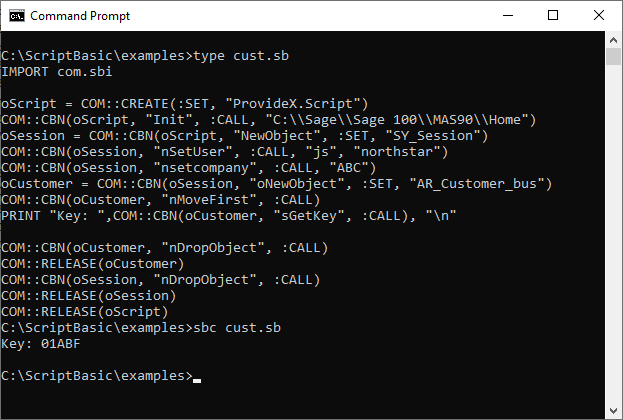
ScriptBasic COM includes an interface viewer that makes working with the object ScriptBasic friendly.
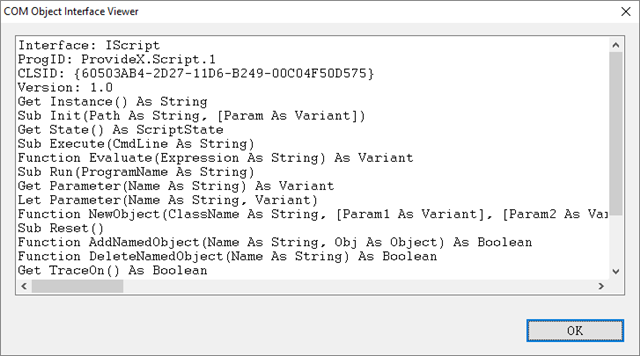
ScriptBasic COM includes an interface viewer that makes working with the object ScriptBasic friendly.
#15
BOI Overview / VBScript Deprecation
Last post by root - May 11, 2026, 06:18 PMIf you are a Sage 100 partner or user that uses Custom Office with BOI (Business Object Interface) scripts that are written in Microsoft VBScript to Interface with ProvideX via a COM interface, take note.
Microsoft has deprecated VBScript in WSH (Windows Shell Host) which is an optional install on Windows 11 and to be removed in future (TBD) is the plan. VBScript: Officially deprecated by Microsoft as of October 2023. It is largely being replaced by Windows PowerShell for administrative tasks.
Microsoft is moving away from VBScript specifically because it is a common attack vector for malware.
ScriptBasic is an embeddable traditional BASIC scripting engine written in ANSI C with a 800 KB footprint. It supports COM to Interface with Sage 100 BOI. I have been using ScriptBasic for years for external BOI interfaces for clients.
Sage 100 currently supports WSH and ProvideX as scripting options. I'm in the process of adding ScriptBasic as an option. ScriptBasic COM is line for line equivalent to VBScript. I plan to write a script to convert VBScript code to ScriptBasic COM.
An added advantage of using ScriptBasic is beside COM support, you can make REST calls from your BOI scripts directly. ODBC, MySQL, SQLite and other extension modules are also available from within ScriptBasic.
The memory footprint for PowerShell typically starts around 30 MB to 100 MB for an idle session, but can quickly scale into the gigabytes depending on the scripts and data being processed. Because it is built on the .NET framework, it uses a managed memory model where memory is allocated and released through a garbage collector.
Windows Script Host (WSH) typically running via wscript.exe or cscript.exe is known for having a very low, lightweight memory footprint, often occupying only a few megabytes of RAM for simple scripts.
Microsoft has deprecated VBScript in WSH (Windows Shell Host) which is an optional install on Windows 11 and to be removed in future (TBD) is the plan. VBScript: Officially deprecated by Microsoft as of October 2023. It is largely being replaced by Windows PowerShell for administrative tasks.
Microsoft is moving away from VBScript specifically because it is a common attack vector for malware.
ScriptBasic is an embeddable traditional BASIC scripting engine written in ANSI C with a 800 KB footprint. It supports COM to Interface with Sage 100 BOI. I have been using ScriptBasic for years for external BOI interfaces for clients.
Sage 100 currently supports WSH and ProvideX as scripting options. I'm in the process of adding ScriptBasic as an option. ScriptBasic COM is line for line equivalent to VBScript. I plan to write a script to convert VBScript code to ScriptBasic COM.
An added advantage of using ScriptBasic is beside COM support, you can make REST calls from your BOI scripts directly. ODBC, MySQL, SQLite and other extension modules are also available from within ScriptBasic.
The memory footprint for PowerShell typically starts around 30 MB to 100 MB for an idle session, but can quickly scale into the gigabytes depending on the scripts and data being processed. Because it is built on the .NET framework, it uses a managed memory model where memory is allocated and released through a garbage collector.
Windows Script Host (WSH) typically running via wscript.exe or cscript.exe is known for having a very low, lightweight memory footprint, often occupying only a few megabytes of RAM for simple scripts.
#16
Language Features / History and Resources
Last post by root - May 11, 2026, 05:51 PMBirth of BASIC
ScriptBasic is written in ANSI C with an object like API. The scripting engine is embeddable, with a thread safe memory manager and virtually unlimited expandability. The core language uses one source tree for all platforms. Variables are maintained in a variant like structure and typeless until used. ScriptBasic runs as console and Windows interpreter, embedded as a DLL and as a multi-threaded webserver. A IDE / Debugger is included.
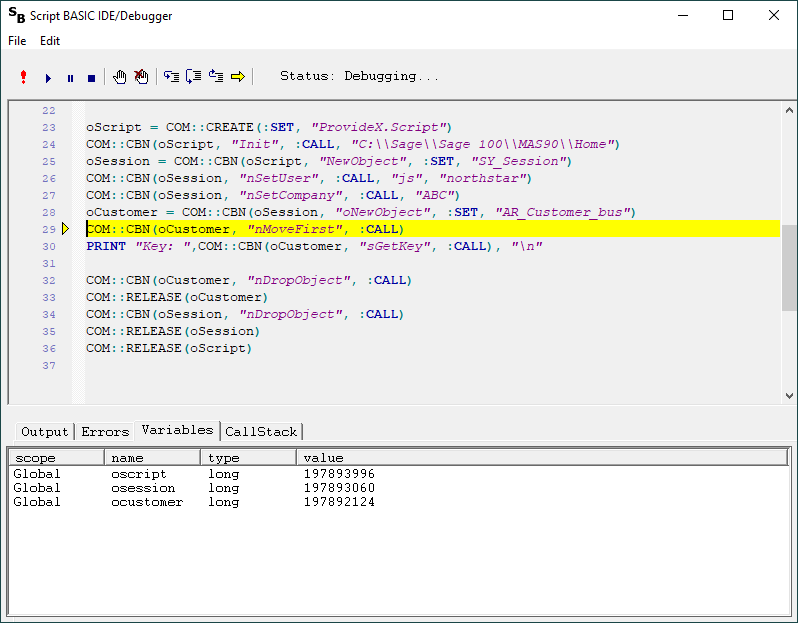
Script BASIC comes with an array of industry standard library extension modules and a multi-threaded proxy HTTPD application server running as an OS service.
Scripting doesn't get any easier and based on a language syntax we all grew up with.
My only complaint about ProvideX is everything is an emulation.
History:
ScriptBasic was created by Peter Verhas from Hungary in 2000. Peter moved on to work for a company in Switzerland as a Java developer. Peter created a ScriptBasic for Java.
I took over maintaining the project in 2006. I've added numerous C extension module libraries for seamless integration with the language. There have been others over the years contributing to the project to make it what it is today.
Repository
The ScriptBasic 32 bit Windows version is available in an Inno install and comes with examples showing how the extension modules are used.
ScriptBasic 32 bit Install
Documentation:
ScriptBasic User Guide
ScriptBasic Developer Guide
Banner Engineering is a commercial user of ScriptBasic for their line of controllers. They created their own copy of the documentation in a PDF. Banner added additional syntax that isn't in standard ScriptBasic.
Banner ScriptBasic User Guide
ScriptBasic is written in ANSI C with an object like API. The scripting engine is embeddable, with a thread safe memory manager and virtually unlimited expandability. The core language uses one source tree for all platforms. Variables are maintained in a variant like structure and typeless until used. ScriptBasic runs as console and Windows interpreter, embedded as a DLL and as a multi-threaded webserver. A IDE / Debugger is included.
Script BASIC comes with an array of industry standard library extension modules and a multi-threaded proxy HTTPD application server running as an OS service.
Scripting doesn't get any easier and based on a language syntax we all grew up with.
My only complaint about ProvideX is everything is an emulation.
History:
ScriptBasic was created by Peter Verhas from Hungary in 2000. Peter moved on to work for a company in Switzerland as a Java developer. Peter created a ScriptBasic for Java.
I took over maintaining the project in 2006. I've added numerous C extension module libraries for seamless integration with the language. There have been others over the years contributing to the project to make it what it is today.
Repository
The ScriptBasic 32 bit Windows version is available in an Inno install and comes with examples showing how the extension modules are used.
ScriptBasic 32 bit Install
Documentation:
ScriptBasic User Guide
ScriptBasic Developer Guide
Banner Engineering is a commercial user of ScriptBasic for their line of controllers. They created their own copy of the documentation in a PDF. Banner added additional syntax that isn't in standard ScriptBasic.
Banner ScriptBasic User Guide
#17
Introduction / Welcome
Last post by root - May 11, 2026, 03:55 PMI would like to welcome Sage 100 users to the Open Sage BOI peer support forum.
If you would like to post to this forum, send me an email to e-mail@johnspikowski.com to become a registered user.
I maintain the ScriptBasic open source project in my spare time being an open source advocate. If you find ScriptBasic helpful with your projects, buying me a 'coffee' would be appreciated.
Buy me a coffee
LinkedIn Profile
If you would like to post to this forum, send me an email to e-mail@johnspikowski.com to become a registered user.
I maintain the ScriptBasic open source project in my spare time being an open source advocate. If you find ScriptBasic helpful with your projects, buying me a 'coffee' would be appreciated.
Buy me a coffee
LinkedIn Profile